


Apartments.com Rental Search
4.710.86K Reviews
App Specs
- Version
- 16.0.0
- Updated On
- License
- Free
- Downloads
- 5,000,000+
- Developer
- CoStar Apartments.com Android Team
- Categories
- House & Home
- Platform
- Android
Screenshots


 Analysis by AppCompare
Ever found yourself in the middle of a rental hunt, feeling like you're searching for a needle in a haystack? Well, Apartments.com Rental Search might just be your new best friend. As someone who's been through the rental game a few times, I was curious to see if this app could make the process any smoother. Spoiler alert: it does, and then some.
Start with the decision that matters most
Before I open any rental search app, I try to separate fixed requirements from preferences. A realistic monthly budget, a workable commute, and the number of people who need to live in the home are hard limits; a balcony or a fitness room may be negotiable. That distinction makes the filters more useful and keeps a long search from becoming a parade of attractive but unsuitable listings.
This is a free house-and-home app from CoStar Apartments.com Android Team. It is rated for Everyone, and its scale is reassuring for a renter who wants a well-used service rather than a little-known directory: it has a 4.7 average from around 95,000 ratings and more than 5 million installs. Those figures do not tell me whether a particular apartment is right, of course, but they do suggest that the app is a familiar starting point for many people looking for a rental.
I would use it as a search and comparison tool, not as a substitute for checking a property carefully. A listing can help me decide which places deserve a closer look, but I still want to confirm the details directly with whoever is offering the home. That simple distinction is important: the app can organize the hunt, while the renter remains responsible for checking the practical terms before making a commitment.
First Impressions and Interface
Upon launching the app, the first thing I noticed was its clean and modern interface. It’s like the designers knew exactly what we, as frantic apartment searchers, needed. The homepage greets you with a straightforward search bar where you can input your desired city or neighborhood. What I appreciate here is the simplicity—no overwhelming graphics or clutter, just a focus on functionality.
The navigation is a breeze. The app uses a tab system that segments your experience into different categories like favorites, search, and saved searches. If you’ve ever used a music streaming app, you’ll find this layout refreshingly familiar. Finding your dream place is a matter of just a few taps, and that’s a win in my book.
Features that Stand Out
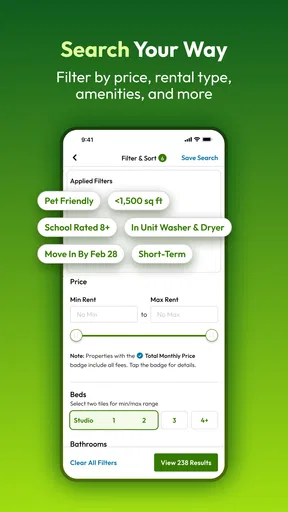
Now, let’s dive into what sets Apartments.com Rental Search apart from the crowd. One feature I found particularly helpful is the detailed filtering system. You can narrow down your search by price range, number of bedrooms, pet-friendliness, and even specific amenities like a pool or gym. It’s like having a personalized concierge service at your fingertips.
Worth Reading Before You Choose

Flipboard Shows What News Apps Must Do Beyond the Feed

Switching to Android Auto Means Rethinking Your Driving Routine

Google Calendar Makes a Crowded Week Easier to Manage

Ludo King Makes the Most of the Minutes Between Plans

Baby Panda World Brings Quick Play to Modern Phones, but Its Game Library Feels Busy

ESPN’s Live Game View Makes Following Close Games Easier
My practical tip is to avoid selecting every nice-to-have filter at the beginning. A strict combination can hide homes that might work perfectly well if you are flexible about one amenity. I start with the essentials, such as an affordable price range and enough bedrooms, then add optional preferences one by one. If the results shrink too sharply, I know which preference is doing the excluding and can decide whether it is worth keeping.
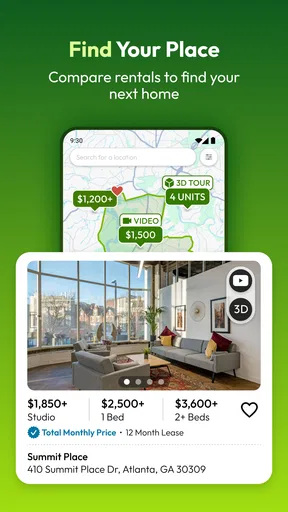
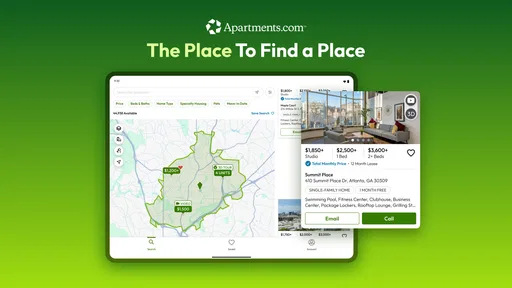
Another standout feature is the map view. This isn't your typical static map. It’s interactive, allowing you to see available apartments in real-time as you pan across different neighborhoods. Plus, the app provides local insights, giving you a taste of what the area is like before you even visit.
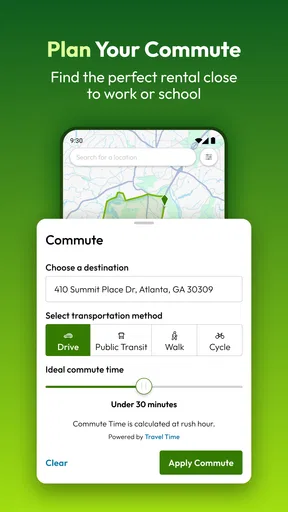
The map is especially useful when a city’s neighborhood names do not line up neatly with the places I actually want to live. I can compare listings around a transit stop, a workplace, or a familiar street instead of relying only on broad area labels. I would still check travel times independently at the hours I expect to commute; seeing a home’s location on a map is a good first screen, not proof that the daily journey will suit me.
Favorites and saved searches also help turn casual browsing into a manageable shortlist. Rather than trying to remember which listing had the useful layout or the better location, I can save candidates and revisit them with the same priorities in mind. A helpful habit is to keep the shortlist small and note why each place made it: location, pet policy, or a feature that solves a real need. That makes comparisons clearer when several listings start to blur together.
The Virtual Tour Experience
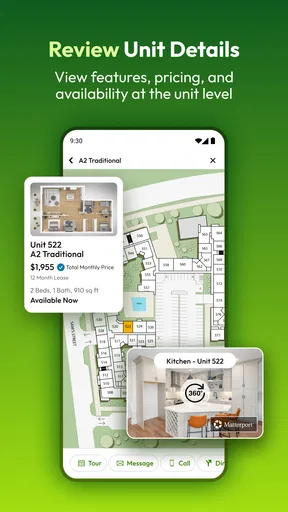
Let’s talk about a game-changer: virtual tours. In today’s world, being able to view a property without physically being there is invaluable. The app offers high-quality video tours for many listings, which is perfect for those of us who want to avoid unnecessary trips. It’s almost like being there in person, minus the hassle.
I treat a tour as a way to rule out obvious mismatches, not as a final inspection. While watching, I look for the layout and whether the rooms connect in a way that makes sense for my routine. I also keep a list of questions for an in-person visit or a conversation with the property contact, especially about details that a camera may not show clearly. This approach is useful if I am moving from another city, but I would not make a decision based only on a polished walkthrough.
A realistic search might look like this: I check listings during a lunch break, save a few that fit my budget and location, and use the map to remove those that would make the commute awkward. Later, I watch available tours and contact only the places that still seem promising. That sequence can save time and unnecessary trips without turning a video into a guarantee that the apartment will meet every expectation.
Where alternatives may fit better
I see this app as a strong choice when I want a broad rental search with filters, a map, saved options, and tours where available. The alternatives are not all the same kind of tool. A local property manager’s own site can be better when I already know which building or company I want to contact. A general classified marketplace may help when I am looking for an individual room or a less conventional arrangement, but I may need to do more of the sorting and verification myself. A housing office or local agent can make more sense when I want personal guidance or have unusual requirements.
That does not make one route universally safer or more complete. I would compare the effort each option asks of me: a directory helps me scan many possibilities, while a direct source can answer questions about a specific property. For a time-sensitive move, I might search broadly here and also check relevant local sources, rather than assuming one app contains every suitable home. If I am searching for a roommate arrangement rather than a conventional rental, I would be particularly careful to use a service and process designed for that situation.
Room for Improvement
No app is perfect, and while Apartments.com Rental Search is impressive, there are a few areas that could use a bit of polish. For instance, while the app provides a lot of listings, occasionally some listings lack detailed descriptions or updated photos. It would be great to see more consistency here, ensuring all potential renters get the full picture.
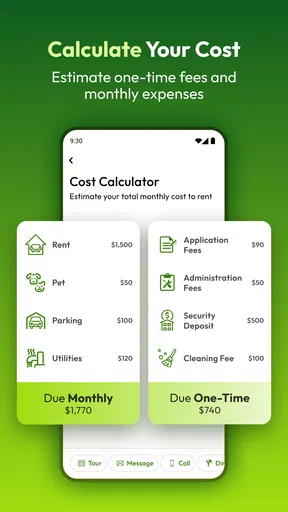
That limitation changes how I read a listing: missing detail is a reason to ask, not a reason to fill in the blanks with assumptions. I would verify what is included in the rent, which fees may apply, whether the advertised availability still holds, and how the application process works before spending time preparing a move. Photos can make a space look appealing, but they cannot answer questions about noise, maintenance, or the exact condition of a home during a visit.
Moreover, while the app is generally speedy, during peak times, there can be slight lags. Nothing too major, but if you’re in a rush, it’s something to keep in mind. Still, these are minor gripes in an otherwise stellar experience.
There is also a human side to the search that no map or saved list can settle. A neighborhood that looks convenient on screen may feel different at the time of day I would usually be there, and a home that meets every filter may still have a layout I dislike. I would use the app to decide what is worth investigating, then make room for a proper visit or direct conversation when possible.
What switching tools really costs
Trying another search route does not mean I have to abandon this one. The real cost is usually attention: I may need to repeat the same budget and location checks, compare listings that use different descriptions, and keep track of conversations in separate places. I reduce that friction by using one short set of requirements and recording the details that matter for each serious candidate, rather than relying on memory or endlessly reopening tabs.
If I move from broad browsing to a property’s own website, I treat that as a handoff, not confirmation that the listing is current or complete. I check that the address and key terms match, then ask any unresolved questions directly. Conversely, if another source surfaces a promising home, I can use the map and filters here to compare its location and basic fit with other options. Keeping the process organized matters more than insisting on a single source.
For renters who are only casually curious, that level of tracking may be unnecessary. But if I have a deadline, several people weighing in, or a narrow set of requirements, a simple shortlist prevents the search from turning into repeated, unfocused browsing. I would also make decisions in stages: first eliminate homes that clearly do not fit, then compare the plausible ones, and finally verify the details before applying.
Who I would recommend it to
I would recommend Apartments.com Rental Search to renters who want to explore several neighborhoods, narrow a large search with practical filters, or compare possible homes without starting from scratch each time. It is particularly helpful for someone planning a move from a distance, because map browsing and available video tours can make an early screening stage easier. The app is free, and its current version is 13.9.0 for devices running Android 10 or later, which gives Android users a straightforward way to check whether it suits their device.
I would be less inclined to rely on it alone if I were looking for a room in a shared home, a highly specific local arrangement, or advice about a complicated lease. In those cases, a specialist local source or a direct conversation may be more useful than filtering a broad rental inventory. I would also skip using any search app as my sole basis for committing to a home: photos, descriptions, and map pins cannot replace checking the actual terms and condition.
Overall, my recommendation is to use it as the organized first pass in a rental search. Start with needs you cannot compromise on, use the map to test whether locations fit your everyday life, and save only the candidates you would genuinely consider. Then verify the details with the people responsible for each property. That combination makes this rental search app useful without asking it to do the parts of renting that require your own judgment.
Pros
- User-friendly interface simplifies searching.
- Comprehensive filters refine search results.
- Detailed listings offer valuable property insights.
- Interactive maps enhance location exploration.
- Push notifications for new listings are timely.
Cons
- Limited offline functionality restricts usage.
- Occasional app crashes disrupt browsing.
- Some listings lack updated photos.
- In-app ads can be intrusive at times.
- Account creation required for full access.
FAQs for Apartments.com Rental Search
What features does the Apartments.com Rental Search app offer?
The Apartments.com Rental Search app provides a comprehensive platform for finding rental properties. Users can access detailed listings with high-resolution photos, virtual tours, and floor plans. The app also includes advanced search filters, neighborhood information, and the ability to save and compare favorite listings. It aims to simplify the apartment hunting process with its user-friendly interface.
How accurate are the listings on the Apartments.com app?
Apartments.com strives to provide accurate and up-to-date listings by partnering with property managers and landlords. The app's team regularly verifies listings to ensure authenticity and accuracy. However, users are encouraged to contact the property directly for the latest availability and details, as listings can occasionally change rapidly.
Is the Apartments.com Rental Search app free to use?
Yes, the Apartments.com Rental Search app is free to download and use. Users can browse listings without any charges. However, certain features, like contacting property managers directly through the app or accessing premium listings, may require account registration. There are no hidden fees for using the app's basic search functionalities.
Can I apply for rentals directly through the Apartments.com app?
Yes, the app allows users to apply directly for rentals through its platform. Many listings offer an 'Apply Now' button, streamlining the application process by letting users submit their information and required documents digitally. This feature simplifies the rental process, saving time and reducing paperwork for prospective tenants.
How do I save and organize my favorite listings in the app?
The Apartments.com app provides a convenient feature to save and organize favorite listings. Users can tap the heart icon on listings to save them to a favorites list. This list can be accessed anytime from the app's main menu, allowing users to easily compare and revisit properties they are interested in, facilitating a more organized search experience.


